
DeNA is continuing to add more events and new features to Pokémon Masters EX on a regular basis. Read on below to learn more:
Earn Music Coins in Pokémon Masters EX for the New Jukebox Feature
Play the Music Coin Challenge Daily Battle Event, and unlock songs to listen to during battles—or anytime!
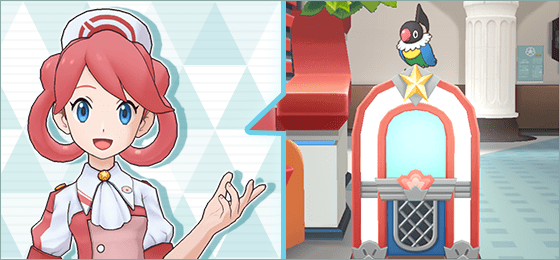
Get down with the sweet tunes of Pokémon Masters EX during the Music Coin Challenge Daily Battle Event! From January 27, 2022, at 11:00 p.m. PST to February 6, 2022, at 10:59 p.m. PST, you can take part in daily battles to earn music coins, which can be used to unlock songs in the Pokémon Center’s new jukebox.
With the jukebox, you can listen to unlocked songs from the Pokémon Masters EX soundtrack whenever you want. Plus, on the battle prep screen, you can now change the music that plays during completed battles to any of the songs in your collection. But this event’s music coins aren’t the only way to unlock songs—you can also unlock songs with song keys. Song keys can be earned in several different ways, such as by obtaining certain items or raising sync pairs to 6★ EX. The more song keys you collect, the more options you’ll have to get your groove on!
Pokémon Masters EX is available to download now, so don’t miss out on all the fun! For more details, be sure to visit the Pokémon Masters EX official site.
Source: Pokemon.com
Jukebox
Jukebox
A Jukebox is now available in the Pokémon Center for you to enjoy the music of Pokémon Masters EX!
Try unlocking songs in the Jukebox and jam to your favorite Pokémon Masters EX tracks!
Jukebox
The Jukebox is a special feature that allows you to enjoy the music of Pokémon Masters EX.
You can tap the Jukebox located in the Pokémon Center to open the Jukebox menu.
Some songs are available from the start, but you’ll need to fulfill specific requirements to unlock other songs.
Note: More songs will be added in future updates.
Playing Music
You can play music by opening the Music Player from the Jukebox menu and selecting the song you wish to play.
Songs that are not yet unlocked will be displayed in gray. Tapping a grayed-out song will show its unlock requirements and play a sample of the song.
Unlocking Songs
You can use a Song Key to unlock the song that matches its number.
You can obtain Song Keys in the following ways:
- Raising the potential of specific sync pairs to 6★ EX.
- Exchanging Music Coins via the Exchange Items menu in the Shop or via Unlock Songs in the Jukebox menu.
Note: You can find out how to obtain Song Keys by viewing the item details.
Note: Regarding Song Keys acquired by raising the potential of certain sync pairs to 6★ EX, if you have already raised the potential of the relevant sync pairs to 6★ EX before this update, you will receive Song Keys automatically upon updating. This is also applicable for songs added in later updates, which are unlocked by raising the potential of certain sync pairs to 6★ EX.
Music Coins
Daily missions will be updated to have Music Coins as mission rewards starting from the date/time below:
- January 30, 2022 at 10:00 p.m.
Note: You may be able to obtain Music Coins from certain events in the future.
Other Improvements
If a sync pair yields a Song Key when their potential is raised to 6★ EX, the Song Key button will be displayed on the sync pair’s details screen, as well as on sync pair scout screens that feature only that sync pair. You can check the Song Key’s details by tapping the button.
Changing Battle Background Music
Along with the addition of the Jukebox music player, background music for completed battles can now be changed.
Tap the icon in the upper right of the battle prep screen to access the background music selection screen. You can choose to play a specific song or a random song during the battle.
Note: During event reruns, even if you had completed a battle previously, you will have to complete it again to be able to change its background music.
Note: Background music in the Battle Villa, Legendary Arena, and Champion Stadium can be changed if you have previously completed the applicable battle or hall.
Important
- To use the Jukebox, you must have completed Main Story Chapter 1: The More the Merrier (Normal) in single-player.
- If you acquire multiple Song Keys with the same number, each extra will be converted into a 3★ Power-Up.
We hope you continue to enjoy Pokémon Masters EX.
Source: Official Pokémon Masters EX site
 Pokémon Blog
One thought on “You can now earn Music Coins in Pokémon Masters EX for the new Jukebox feature”