
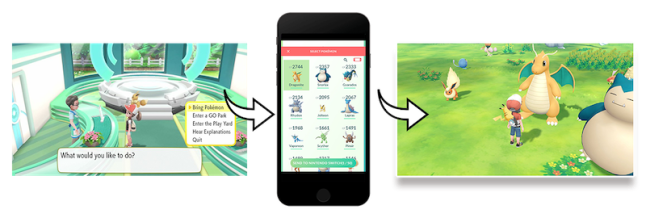
How to Transfer Pokémon (Pokémon: Let’s Go, Pikachu! / Pokémon: Let’s Go, Eevee!)
Read on below for instructions on the different ways to transfer Pokémon in Pokémon: Let’s Go, Pikachu! and Pokémon: Let’s Go, Eevee!.
Additional Information:
- You can transfer Pokémon in the following ways:
- Transfer Pokémon originally discovered in the Kanto region, including their Alolan and Shiny variants, from the Pokémon GO smart device app into Pokémon: Let’s Go, Pikachu! or Pokémon: Let’s Go, Eevee!
- Copy a Pokémon from Pokémon: Let’s Go, Pikachu! or Pokémon: Let’s Go, Eevee! into the Poké Ball Plus for a walk, and then return it to the same game.
- Trade Pokémon between two copies of Pokémon: Let’s Go, Pikachu! or Pokémon: Let’s Go, Eevee! online or via local wireless.
Complete These Steps:
Transfer Pokémon from Pokémon GO app
- Please note the following before transferring Pokémon from the Pokémon GO app:
- This feature becomes available when you reach Fuchsia City in Pokémon: Let’s Go, Pikachu! or Pokémon: Let’s Go, Eevee!.
- Pokémon originally discovered in the Kanto region (including their Alolan and Shiny variants) can be transferred from Pokémon GO. Special event Pokémon or Pokémon discovered in a different region cannot be transferred.
- Pokémon cannot be moved from Pokémon: Let’s Go, Pikachu! and Pokémon: Let’s Go, Eevee! to the Pokémon GO app.
- Pair your Pokémon GO account with Pokémon: Let’s Go, Pikachu! or Pokémon: Let’s Go, Eevee! on Nintendo Switch.
- Choose the Pokémon you want to transfer from Pokémon GO:
- On Pokémon Go, tap the Poké Ball icon, then select “Pokémon.”
- Tap the Nintendo Switch icon in the upper-right corner.
- Tap the Pokémon you want to transfer, then “Send to Nintendo Switch.”
- Select “Yes” when asked if you want to transfer the Pokémon to Nintendo Switch.
- Select “OK.”
- Set up your Nintendo Switch to receive the Pokémon:
- Launch your game on Nintendo Switch and go to the GO Park complex in Fuchsia City.
- Speak to the person at the counter.
- Select “Bring Pokémon,” then select a GO Park from the list.
- Select “Start Communication.”
- The smart device and Nintendo Switch will search for each other. When the connection is made, select “Yes” on Nintendo Switch to receive the Pokemon.
- Select “OK” on Pokémon GO to finish, and you can catch Pokémon you bring from the Pokémon GO app at GO Park.
Move Pokémon to (or from) a Poké Ball Plus
- For help sending a Pokémon between a Poké Ball Plus and Pokémon: Let’s Go, Pikachu! or Pokémon: Let’s Go, Eevee!, click here.
Trade Pokémon with another copy of the game
- For help trading Pokémon between two copies of Pokémon: Let’s Go, Pikachu! or Pokémon: Let’s Go, Eevee!, click here.
Source: Nintendo Support
 Pokémon Blog
4 thoughts on “How to transfer Pokémon in Pokémon Let’s Go Pikachu and Let’s Go Eevee”